
How to Add LocalBusiness Schema to a WordPress Site
Build LocalBusiness JSON-LD for a WordPress site: the right subtype, Google's required and recommended properties, awkward opening hours, a tested must-use plugin and how to check the result.
 Keyur
13 min read

On this page
To add LocalBusiness schema to a WordPress site, write a JSON-LD block for the business and output it on the home page, the contact page or both. The block uses the most specific business type that fits, such as Dentist or Plumber. Google requires two properties: name and address. It recommends telephone, url, geo, openingHoursSpecification and priceRange. You can add the block through your SEO plugin, a schema plugin or a small must-use plugin, but use only one source. Then check it with Google's Rich Results Test.
This post walks through building the markup, choosing the right type, writing opening hours for awkward cases and adding it to WordPress without duplicates. It also covers testing the result. We checked every example against the Schema.org vocabulary (release 30.0). We also ran the WordPress code on a test site (WordPress 7.1.3) to confirm it outputs one valid block on the right pages and none elsewhere.
What LocalBusiness markup does
LocalBusiness structured data describes a business with a physical location or service area: its name, address, phone number, hours and location on a map. Google's documentation says it can help Google show business details in Search and Maps. As with all structured data, it makes a page eligible for these features but does not guarantee them, and it must match what the page shows.
If you are new to structured data, our guide to what schema markup is explains JSON-LD, types and properties first. This post assumes that background and concentrates on LocalBusiness.
<h2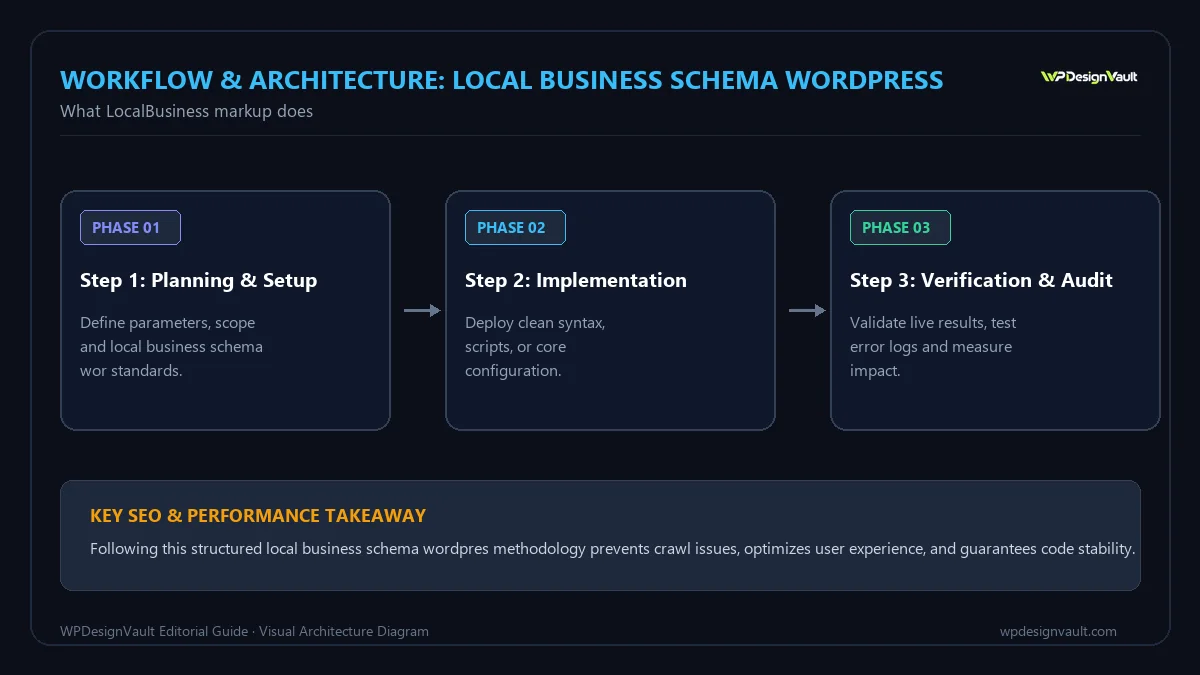
Before you start
- Collect the exact business details as they appear on your contact page and any business listings: name, street address, postcode, phone with country code, opening hours and holiday closures.
- Get map coordinates. Google asks for latitude and longitude with at least five decimal places. Most map apps give six or more when you drop a pin.
- Check what your site already outputs. Run your home page through the structured data checker. Many SEO plugins output an
Organizationblock; some themes add their own markup. - Decide where it goes. Google says you can add LocalBusiness markup to any page, but a page about the business, usually the home or contact page, is the natural home.
Step 1: choose the most specific type
Google recommends using the most specific LocalBusiness subtype available. Schema.org has dozens, grouped by sector:
Table: Examples of LocalBusiness subtypes
| Business | Type to use |
|---|---|
| Dental practice | Dentist |
| Plumber, electrician, roofer | Plumber, Electrician, RoofingContractor |
| Restaurant or café | Restaurant, CafeOrCoffeeShop |
| Hair salon | HairSalon |
| Accountant or lawyer | AccountingService, LegalService |
| Shop | Store or a subtype such as BookStore |
| Nothing specific fits | LocalBusiness |
Search the type's name on schema.org to confirm it exists. Making one up, such as DentalClinic, produces markup search engines do not recognise.

Step 2: write the JSON-LD
This illustrative example is for a fictional dental practice. Every value must be replaced with your own.
{
  "@context": "https://schema.org",
  "@type": "Dentist",
  "@id": "https://example.com/#dentist",
  "name": "Riverside Dental Studio",
  "url": "https://example.com/",
  "logo": "https://example.com/wp-content/uploads/riverside-logo.png",
  "image": "https://example.com/wp-content/uploads/reception.jpg",
  "telephone": "+1-416-555-0142",
  "priceRange": "$$",
  "address": {
    "@type": "PostalAddress",
    "streetAddress": "120 Example Avenue, Suite 4",
    "addressLocality": "Toronto",
    "addressRegion": "ON",
    "postalCode": "M5V 0A0",
    "addressCountry": "CA"
  },
  "geo": {
    "@type": "GeoCoordinates",
    "latitude": 43.64251,
    "longitude": -79.38709
  },
  "openingHoursSpecification": [
    {
      "@type": "OpeningHoursSpecification",
      "dayOfWeek": ["Monday", "Tuesday", "Wednesday", "Thursday"],
      "opens": "08:30",
      "closes": "18:00"
    },
    {
      "@type": "OpeningHoursSpecification",
      "dayOfWeek": "Friday",
      "opens": "08:30",
      "closes": "15:00"
    }
  ],
  "sameAs": [
    "https://www.facebook.com/example-riverside-dental",
    "https://www.instagram.com/example_riverside_dental"
  ]
}
Table: What each part does
| Property | Google's status | Notes |
|---|---|---|
name |
Required | The business name exactly as customers see it |
address |
Required | A PostalAddress with as many fields as apply; use a two-letter country code |
telephone |
Recommended | Google says to include the country code and area code |
url |
Recommended | The business's main page |
geo |
Recommended | Latitude and longitude, at least five decimal places |
openingHoursSpecification |
Recommended | One object per set of days with the same hours |
priceRange |
Recommended | A short indicator such as $$ |
@id |
Optional | A stable identifier so other markup can refer to the business |
sameAs |
Optional | Links to official profiles on other sites |
Leave out anything you cannot show on the page. In particular, Google lists reviews and aggregate ratings as recommended only for sites that publish reviews of other local businesses. Do not add star ratings to your own business's markup.
The local business schema generator builds this structure from a form, including opening hours rules and map coordinates, so you do not have to type the JSON by hand.
Step 3: handle awkward opening hours
Google's documentation gives patterns for the cases that trip people up:
Table: Opening hours patterns
| Situation | How to write it |
|---|---|
| Closed all day | "opens": "00:00", "closes": "00:00", or leave that day out |
| Open 24 hours | "opens": "00:00", "closes": "23:59" |
| Open past midnight | One object with a closing time after the opening time wraps to the next day, for example opens 18:00, closes 03:00 |
| Seasonal or holiday hours | Add validFrom and validThrough dates in YYYY-MM-DD format |
| Different hours on different days | One object per group of days that share the same hours |
For example, a holiday closure from 24 to 26 December is a separate object:
{
  "@type": "OpeningHoursSpecification",
  "dayOfWeek": ["Monday", "Tuesday", "Wednesday", "Thursday", "Friday"],
  "opens": "00:00",
  "closes": "00:00",
  "validFrom": "2026-12-24",
  "validThrough": "2026-12-26"
}
Step 4: add it to WordPress
Pick one method. Two sources of LocalBusiness markup with different details are worse than none.
Option A: your SEO or schema plugin
Some SEO plugins and dedicated schema plugins offer local business settings, sometimes in a paid add-on. If yours does, fill in the fields there so the markup connects to the rest of the plugin's schema graph. Check the output afterwards: plugins vary in which properties they include.
Option B: a small must-use plugin
If your plugin has no local business option, or you want full control, a must-use plugin can output the block. Save this as wp-content/mu-plugins/local-business-schema.php and replace the details:
<?php
/**
 * Plugin Name: LocalBusiness schema
 * Description: Outputs LocalBusiness JSON-LD on the home and contact pages.
 */
add_action( 'wp_head', function () {
    if ( ! is_front_page() && ! is_page( 'contact' ) ) {
        return;
    }
    $data = array(
        '@context'   => 'https://schema.org',
        '@type'      => 'Dentist',
        '@id'        => home_url( '/#dentist' ),
        'name'       => 'Riverside Dental Studio',
        'url'        => home_url( '/' ),
        'telephone'  => '+1-416-555-0142',
        'priceRange' => '$$',
        'address'    => array(
            '@type'           => 'PostalAddress',
            'streetAddress'   => '120 Example Avenue, Suite 4',
            'addressLocality' => 'Toronto',
            'addressRegion'   => 'ON',
            'postalCode'      => 'M5V 0A0',
            'addressCountry'  => 'CA',
        ),
        'geo'        => array(
            '@type'     => 'GeoCoordinates',
            'latitude'  => 43.64251,
            'longitude' => -79.38709,
        ),
        'openingHoursSpecification' => array(
            array(
                '@type'     => 'OpeningHoursSpecification',
                'dayOfWeek' => array( 'Monday', 'Tuesday', 'Wednesday', 'Thursday' ),
                'opens'     => '08:30',
                'closes'    => '18:00',
            ),
            array(
                '@type'     => 'OpeningHoursSpecification',
                'dayOfWeek' => 'Friday',
                'opens'     => '08:30',
                'closes'    => '15:00',
            ),
        ),
    );
    echo '<script type="application/ld+json">' . wp_json_encode( $data ) . '</script>' . "n";
} );
On our test site, this produced exactly one JSON-LD block on the home page and one on the page with the slug contact, and none on a blog post. The output passed our Schema.org vocabulary check. Building the data as a PHP array and encoding it with wp_json_encode() avoids the most common hand-written JSON errors: missing commas, trailing commas and unescaped quotes.
Option C: a block in the page content
You can paste a <script type="application/ld+json"> block into a Custom HTML block or a page builder's HTML widget. It works, but it is easy to forget when details change, and editors without the unfiltered_html capability cannot save script tags. Prefer Option A or B on sites with several editors.
Worked example: a service-area business
A plumber who visits customers rather than receiving them still needs an address for Google's required properties, usually the registered business address. Use areaServed to describe where it works. This fictional example also shows a 24-hour service:
{
  "@context": "https://schema.org",
  "@type": "Plumber",
  "name": "Northgate Plumbing",
  "url": "https://example.com/",
  "telephone": "+44 161 496 0000",
  "address": {
    "@type": "PostalAddress",
    "streetAddress": "Unit 7, Example Trade Park",
    "addressLocality": "Manchester",
    "postalCode": "M1 1AA",
    "addressCountry": "GB"
  },
  "areaServed": [
    { "@type": "City", "name": "Manchester" },
    { "@type": "City", "name": "Salford" },
    { "@type": "City", "name": "Stockport" }
  ],
  "openingHoursSpecification": {
    "@type": "OpeningHoursSpecification",
    "dayOfWeek": ["Monday", "Tuesday", "Wednesday", "Thursday", "Friday", "Saturday", "Sunday"],
    "opens": "00:00",
    "closes": "23:59"
  }
}
If the address is a home and should not be public, think carefully before publishing it in markup, because structured data must match visible content. In that case, publishing the business details without a street address on the page may mean the page is not eligible for the feature. That is a reasonable trade-off for privacy.
Keep every copy of your details consistent
Your business details now exist in several places: the visible contact page, the JSON-LD, your footer, and listings on other sites such as map services and directories. When one of them changes and the others do not, people and search engines see conflicting information. A short routine prevents that:
- Keep one master record of the name, address, phone number and hours, for example in a shared document, and update it first.
- Use the same format everywhere. If the page says "Suite 4", the markup should not say "Unit 4".
- Update the page and the markup together. If the markup is hard-coded in a plugin file, add a note to your change process so it is not forgotten.
- Plan holiday hours in advance. Add the
validFromandvalidThroughentry when you announce the closure, and remove it afterwards. - Re-test after theme or plugin changes. A new SEO plugin may start outputting its own business markup alongside yours.
Consistency will not guarantee any search feature, but inconsistency is an avoidable reason for search engines to distrust the details.
Several locations
- Give each location its own page with its own LocalBusiness block, and its own address, phone and hours.
- Give each block a different
@id, such ashttps://example.com/locations/leeds/#location. - On the home page, describe the parent organisation with
Organizationrather than listing every branch as a LocalBusiness.
Step 5: test and monitor
- Check the JSON if you wrote it by hand: paste it into the JSON validator. Our guide to fixing JSON syntax errors covers the usual causes.
- Check the live page with the structured data checker. You should see one LocalBusiness-type block, not two.
- Run Google's Rich Results Test on the URL and fix any errors. Warnings about missing recommended properties are not blocking, but add the information if the page shows it.
- Check the Schema Markup Validator at validator.schema.org for vocabulary problems, such as a misspelled type.
- Keep it current. When hours, phone numbers or addresses change, update the markup on the same day as the page.
Common mistakes
- Using the generic
LocalBusinesstype when a specific subtype exists. - Adding self-written star ratings to your own business.
- Hours in the markup that differ from the hours on the page.
- A phone number without the country code.
- Coordinates rounded to two or three decimal places.
- The same business marked up twice, by a plugin and by hand, with different details.
- Inventing a type name that does not exist on schema.org.
- Copying an example and forgetting to replace every value.
Troubleshooting
Table: LocalBusiness markup problems
| Symptom | Likely cause | Fix |
|---|---|---|
| Rich Results Test detects no items | JSON syntax error, or the block is not on the page | Validate the JSON; view source to confirm it is output |
| "Missing field 'address'" | No address, or it is a plain string | Use a PostalAddress object |
| Two LocalBusiness items detected | Plugin and custom code both output markup | Remove one source |
| "Unknown type" in the Schema Markup Validator | Misspelled or invented type | Check the type name on schema.org |
| Markup missing on the contact page | The page slug is not contact |
Change the condition to the real slug or page ID |
| Old hours still show in tests | Page cache serving an old copy | Purge the cache and test again |
Frequently asked questions
What is LocalBusiness schema?
It is Schema.org structured data that describes a business with a location or service area: its name, address, phone, hours and coordinates. Google can use it to show business details in Search and Maps.
Which properties does Google require?
Only name and address. Google also recommends telephone, url, geo, openingHoursSpecification and priceRange, among others.
Which page should the markup go on?
Google says any page can carry it, but the home page or contact page, where the business details are shown, is the most natural place.
Do I need a plugin to add LocalBusiness schema?
No. A short must-use plugin can output it, as shown above. An SEO or schema plugin with local business settings is easier to maintain for non-developers.
Should I add star ratings to my own business markup?
No. Google recommends review and rating properties only for sites that capture reviews of other local businesses.
How precise should the coordinates be?
Google asks for at least five decimal places of latitude and longitude. Drop a pin in a map app and copy the full coordinates.
How do I mark up a business that is closed on some days?
Leave the closed day out, or set both opens and closes to 00:00. Use validFrom and validThrough for holiday closures.
Can a service-area business use LocalBusiness schema?
Yes. Include the required address and describe the area covered with areaServed. If the address must stay private, the page may not be eligible for the feature.
Does LocalBusiness schema help local rankings?
Google does not describe structured data as a ranking factor. It helps Google understand and display business details accurately.
How do I handle several locations?
Create a page for each location with its own LocalBusiness block and a unique @id, and describe the parent brand on the home page with Organization markup.
Next step
Generate your block with the local business schema generator, add it with one of the methods above, and confirm the live page with the structured data checker and Google's Rich Results Test.
Related free tools for this topic
Local Business Schema Generator
Generate LocalBusiness JSON-LD with address, phone, opening hours and map coordinates for a local business website.
WordPress Snippet Generator
Generate clean, escaped WordPress code for the tasks developers repeat most: enqueueing scripts and styles, shortcodes, widget areas,…
WordPress Salt & Security Key Generator
Generate a fresh set of WordPress security keys and salts in your browser, ready to paste into wp-config.php.
wp-config.php Generator
Generate a complete wp-config.php with database details, newly generated security keys, debug settings and useful constants. Keys are…
Website Word Counter: Count Words on a Web Page
Count the visible words on any web page and see its most frequent terms, without copying and pasting…
HTTP Headers Checker
View the HTTP response headers of any URL and check caching, compression and common security headers such as…
Related resources

SaaS hero with dashboard preview
Two-column hero: headline, supporting text, two buttons and a trust line beside a visual panel. Stacks to one…
Centred SaaS hero with product window
Centred hero with a large headline, supporting text and two buttons, with optional highlights and a product window…
Dark studio hero with service highlights
Centred hero with a large headline, supporting text and two buttons, with optional highlights and a product window…
Related articles

FAQ Schema After Google Dropped FAQ Rich Results: Is It Still Worth Adding?
Google retired FAQ rich results in May 2026. What changed, what FAQPage markup still does, and a decision guide for keeping, removing…
Does Keyword Density Still Matter?
Google gives no target keyword density, but unnatural repetition counts as keyword stuffing. How density is calculated, what Yoast's check uses, and…
Elementor Free vs Pro: What You Can Build with the Free Version
What Elementor's free version includes, what Pro adds on each plan, a worked example of a brochure site built for free, and…
Related guides
How Long Should a Meta Title Be? Pixels vs Characters Explained
"Keep it under 60 characters" is only half right. Google cuts titles by pixel width, not character count. Learn how to write…
The Default WordPress .htaccess File (and Safe Additions)
The exact .htaccess rules WordPress needs for pretty permalinks, what each line does, tested additions for HTTPS and file protection, and a…

Fluid Typography in Elementor with clamp()
Setting a heading to 56 px on desktop, 44 px on tablet and 32 px on mobile works, but text jumps between…
Comments